
This is an old revision of the document!
Table of Contents
Plugins
This section present the plugin management in GroIMP.
Managing plugins
GroIMP plugins are located in directories by default:
/path/where/groimpisinstalled/plugins/~/.grogra.de-platform/plugins/
Additionally, it is possible to add a directory with the argument -p /path/to/directory/. (e.g. java -jar core.jar -p /dir/).
When GroIMP starts it will automatically load every plugin in the given paths.
Note: It is possible to ignore a plugin path by adding it to the blacklisted file in ~/.grogra.de-platform/blacklisted.
Manually
It is possible to manually add or remove a plugin by simply copying/deleting them from the loaded paths.
The added plugin needs to be compiled and follow the compiled plugin structure.
Note: If you do not have the permission to delete a repository from the GroIMP installation folder, you can prevent the plugin from being loaded by adding it to the blacklisted file.
Plugin manager
The Plugin Manager panel provides a graphical interface for managing plugins. It allows users to view currently installed plugins, check for available updates, install new plugins, and deactivate or remove existing ones. The panel displays installed and available plugins in a unified layout: plugin categories are listed on the left, and selecting a plugin shows its description on the right. Changes made during a session (such as installations, updates, or removals) are listed in a review area at the bottom of the panel.

Installed plugins offer three selection states:
- A checked box keeps the plugin installed.
- An empty box marks it for removal.
- A partially checked box deactivates the plugin without uninstalling it.
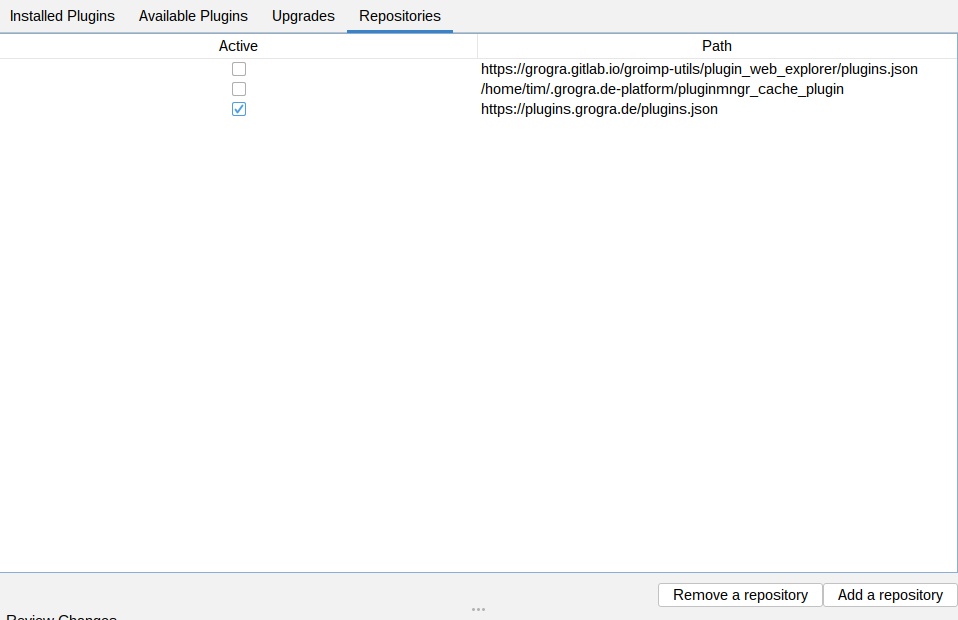
By default, plugins are loaded from an official repository provided by the GroIMP development team (an online version can be found here. However, users can add or select other plugin sources through the “Repositories” tab of the panel, making it easy to integrate custom or third-party repositories.
Usage from commandline
it is possilbe to install plugins without opening GroIMP by using the following commands:
#install
java -jar core.jar --headless -- -cmd /pluginmanager/commands/installCMD=de.grogra.gltf;de.grogra.cli

#uninstall
java -jar core.jar --headless -- -cmd /pluginmanager/commands/uninstallCMD=de.grogra.gltf;de.grogra.cli

#disable
java -jar core.jar --headless -- -cmd /pluginmanager/commands/disableCMD=de.grogra.gltf;de.grogra.cli
Deleting/ Deactivating plugins
1. The parameter file: GroIMP can load options as parameters from either: the default file (in ~/.grogra.de-platform/groimp.properties) or from a file given when starting groimp: “java -jar core.jar -t “path/to/perfs.properties”. The preference file is loaded when groimp starts and its content is used instead of java preferences when an option is queried in groimp. The option name follow the complete name of its registry path (I will provide a list of all option and their paths in the wiki). But for example the option useJRT can be defined as : /de/grogra/options/rgg/javaimport/useJRT=true
2. The plugin manager is accessible from the GUI under “Help>Plugin manager”. Its goal is to help install/ remove/ update groimp plugins. So users can get small fixes in plugins without having to re download /reinstall a whole new groimp version. And (maybe?) if users create new plugins and decide to share them, It could make them available for all other users. From the plugin manager GUI, you can “install”, “update”, “disable”, “remove” plugins. install will try to download it from the given source then dump it in the selected path (selected in the options/ by default ~/.grogra.de-platform/plugins). update: each plugin display its available versions. By selecting a different version you can upgrade/downgrade a plugin. This will download the new version from the given source, extract it under the plugin path, and remove the old version. disable is more usefull for me to debug. It set some groimp option to load the given plugin as disabled. They are then not usable from groimp. But they are not removed. It adds the option under the currently used property file (either one passed with ”-t“ or the default one). remove simply delete the plugin. It removes it from the computer (so be careful). For groimp instances where the installation path is not writable (usually on windows if you don't run groimp in admin) then, there is an option in groimp to “blacklist” plugin instead of deleting them. It adds their path to a file under (~/.grogra.de-plaftorm/blacklist). Blacklisted plugins are not loaded in groimp so a new version can be installed. (blacklist and disable are different: one is loaded but disabled the other is not loaded). The list of available plugin is provided by the “repositories” that you can see under the plugin manager “repositories”. You can add your repositories that contains plugin metadata as (a JSON that contains the plugins data or a local directory in which some groimp plugin exist). All of these actions are doable from groim commands. Thus, accessible from the api, cli, and in headless with the command parameter.
Structure
Any repository with a plugin.xml and plugin.properties files is considered as a plugin by GroIMP.
To be properly loadable though, the plugin.xml needs to include:
<?xml version="1.0" encoding="UTF-8"?>
<plugin id="your.plugin.id"
version="x.x"
xmlns="http://grogra.de/registry" >
where plugin id and version need to be filled with the plugin information.
Resources in Plugins
Define resources used in plugins
Grogra.de mirror
The main plugin manager repository, as well as most of the released plugins, are hosted on gitlab.com. If you for any reason cant access gitlab.com a mirror is provided at: https://plugins.grogra.de/
To enable this mirror in the plugin manager, go to the “Repositories” tab and add a new repository (press the “Add a repository” button). Set the new repository to “https://plugins.grogra.de/plugins.json” and active it. At this point you might also deactivate the “grogra.gitlab.io” repository, but this step is not necessary.
All plugins [AG]
This section present the exhaustive list of available plugins from the GroIMP gitlab repository.
This section is automatically generated.