
01_user_documentation:03_interacting_with_groimp:02_panels:19_assets_libraries:01_texturelibrary
This is an old revision of the document!
Table of Contents
TextureLibrary
provided by the plugin Texture Library
A set of images of barks and leafs that can be used input for different shaders (GGX,Ward, Phong shader).
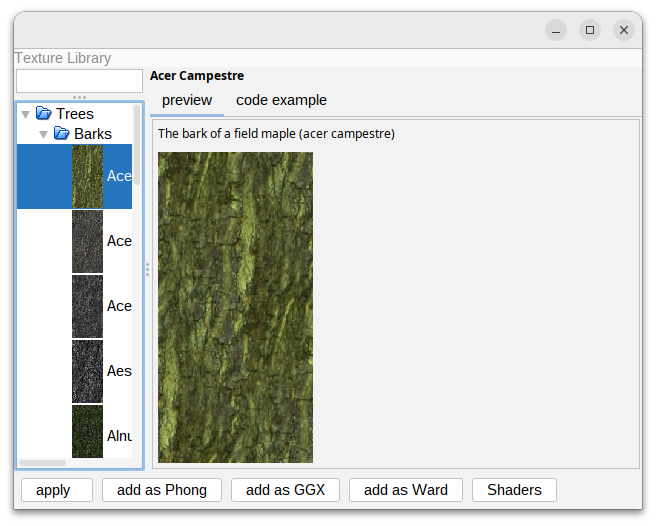
Functionalities
- apply: apply on a selected 3d object or a selected shader(phong, ggx, or ward)
- add as Phong: creates a Phong shader and adds it to the shader explorer
- add as GGX: creates a GGX and adds it to the shader explorer
- add as Ward: creates a Ward and adds it to the shader explorer
- Shaders: open the shader explorer
It is also possible to directly apply the shader to a selected Object.
usage in RGG
To use this shader through RGG code a set of functions can be used:
to get a reference to the image:
getTexture("texturesDB/trees/barks/Acer Campestre")
To get a imageMap with the image embedded:
getTextureMap("texturesDB/trees/barks/Acer Campestre")
To get a Phong Shader with the texture included:
getTexturePhong("texturesDB/trees/barks/Acer Campestre")
To get a GGX Shader with the texture included:
getTextureGGX("texturesDB/trees/barks/Acer Campestre")
To get a Ward Shader with the texture included:
getTextureWard("texturesDB/trees/barks/Acer Campestre")
A simple working example could be:
protected void init ()
[
  Axiom ==> A.setShader(getTexturePhong("texturesDB/trees/barks/Acer Campestre"));
]
01_user_documentation/03_interacting_with_groimp/02_panels/19_assets_libraries/01_texturelibrary.1790086461.txt.gz · Last modified: (external edit)