
01_user_documentation:03_interacting_with_groimp:02_panels:19_assets_libraries:01_texturelibrary
Table of Contents
TextureLibrary
provided by the plugin Texture Library
A set of images of barks and leafs that can be used input for different shaders (GGX,Ward, Phong shader).
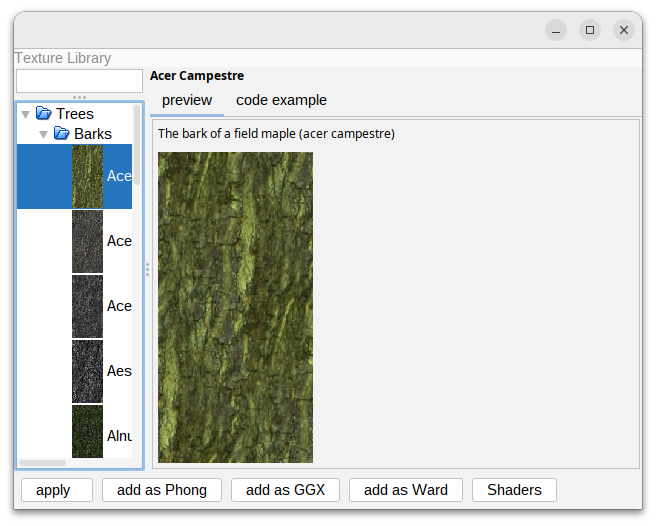
Functionalities
From the panel it is possible to use the following functions on a selected texture:
- apply: apply on a selected 3d object or a selected shader(phong, ggx, or ward)
- add as Phong: creates a Phong shader and adds it to the shader explorer
- add as GGX: creates a GGX and adds it to the shader explorer
- add as Ward: creates a Ward and adds it to the shader explorer
- Shaders: open the shader explorer
usage in RGG
To use this shader through RGG code a set of functions can be used:
to get a reference to the image:
getTexture("texturesDB/trees/barks/Acer Campestre")
To get a imageMap with the image embedded:
getTextureMap("texturesDB/trees/barks/Acer Campestre")
To get a Phong Shader with the texture included:
getTexturePhong("texturesDB/trees/barks/Acer Campestre")
To get a GGX Shader with the texture included:
getTextureGGX("texturesDB/trees/barks/Acer Campestre")
To get a Ward Shader with the texture included:
getTextureWard("texturesDB/trees/barks/Acer Campestre")
A simple working example could be:
protected void init ()
[
  Axiom ==> A.setShader(getTexturePhong("texturesDB/trees/barks/Acer Campestre"));
]
01_user_documentation/03_interacting_with_groimp/02_panels/19_assets_libraries/01_texturelibrary.txt · Last modified: by Tim