
01_user_documentation:03_interacting_with_groimp:02_panels:19_assets_libraries:05_growthfunction
Table of Contents
Growth function library
provided by the plugin Growthfunctionlibrary
A set of growth functions that follow the GroIMP standard of math functions and can be used through the function explorer.
The panel allows users to brows and customize growth functions.
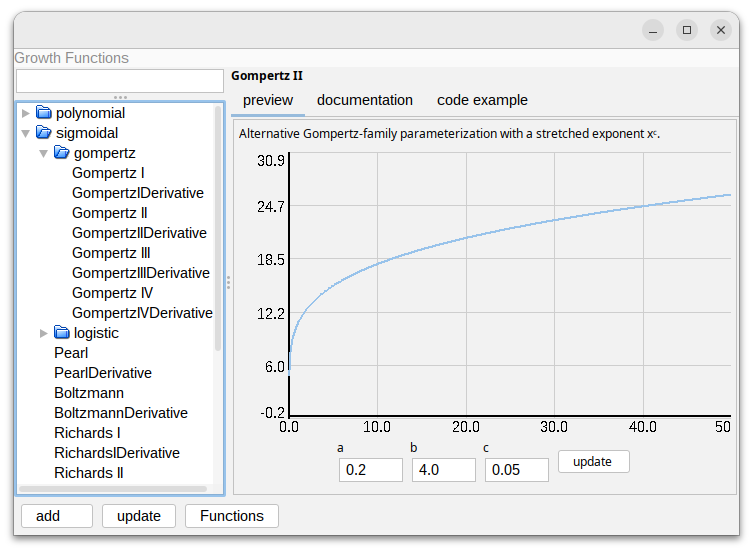
Functionalities
- add: Adds the currently selected growth function with the current parameters as a function to the function explorer
- update: If the same function is selected (e.g. in the explorer) the current parameters are pushed to the selected function
- Functions: Open the function explorer
In RGG
The growth function can be treated as an java object and then address using the index operator.
import de.grogra.growthfunctionlibrary.functions.GompertzI;
public void run(){
 GrowthFunctionBase f = new GompertzI(100.0,3.0,0.12);
	for(int x = 0; x < 10; x++){
		println(f[x]);
	}
}
It is also possible to use a GrowthFunctionBase object as a field for a node or class:
import de.grogra.growthfunctionlibrary.functions.GompertzI;
module Bud(int age, GrowthFunctionBase f);
protected void init()[
Axiom ==> Bud(0,new GompertzI(100.0,3.0,0.12));
]

public void grow()[
	Bud(a,f) ==> F(f[a]) Bud(a+1,f);
]
This allows us to edit or change the growth function for each bud during the simulation
Using the Explorer
A growth function can also be added to the function explorer (Panels → Explorers → Math → Functions) After it is added it can be referenced from rgg using this code:
function("name")[3]
01_user_documentation/03_interacting_with_groimp/02_panels/19_assets_libraries/05_growthfunction.txt · Last modified: by Tim